
Guided, not wired
Prompts, dimensions, samplers, and models are laid out as plain controls. Switch settings without ever touching a node or a connection.
Make images. Not node graphs.
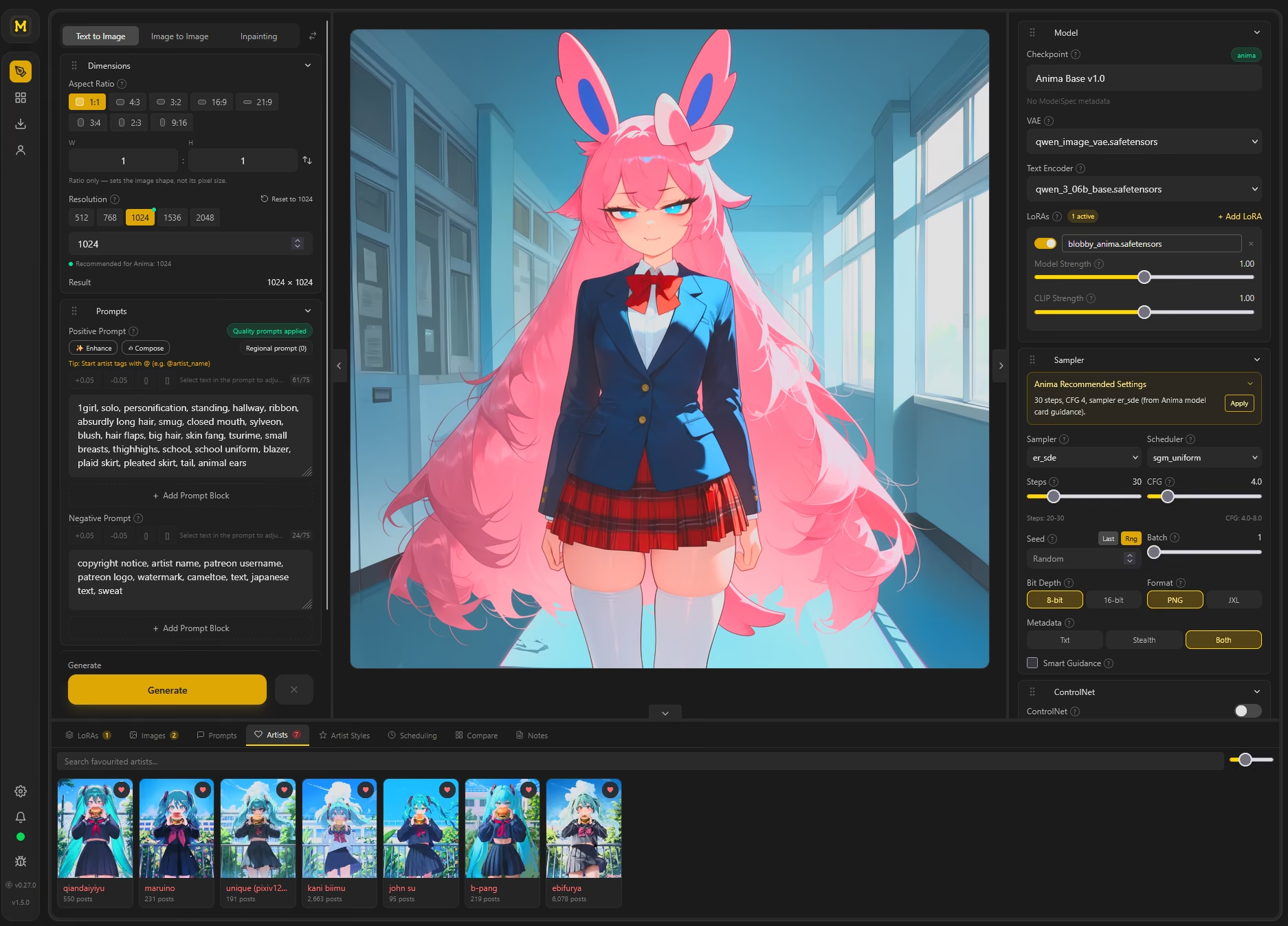
MooshieUI keeps ComfyUI's power and hides its complexity behind controls that make sense.
Prompts, dimensions, samplers, and models are laid out as plain controls. Switch settings without ever touching a node or a connection.
Text to image, image to image, and inpainting. Switchable with a single click, sharing the same prompt and model setup.
Stack LoRAs with independent model and CLIP strength, and apply bundled artist styles that inject tags without cluttering your prompt.
Tiled-diffusion upscaling with OmniSR. Every tile is denoised simultaneously each step for seamless, high-quality results.
Generate batches and line results up in a compare grid to find the seed, sampler, or prompt tweak that actually worked.
The browser build is mobile-aware, so you can kick off and check on generations from any device on your network.
MooshieUI ships as a native desktop app and a self-hostable web server. Pick whichever fits your setup. The UI is identical.
A native app built with Tauri and a Rust core. Fast to start, light on memory, no Electron bloat. Windows and Linux ship as ready-to-run builds. macOS has a native Apple Silicon installer with Apple Metal (MPS) acceleration.
Run the built-in web server and reach MooshieUI from any device on your LAN. Docker-friendly and mobile-aware. Perfect for a GPU box in the closet and a laptop on the couch.
Type a positive and negative prompt, or apply quality prompts and artist styles. Pick an aspect ratio and resolution from presets.
Choose a checkpoint, stack LoRAs, and set your sampler. Or hit “Apply” to load the model's recommended steps, CFG, and scheduler.
Watch live progress, then send the result through the tiled refiner for a clean, high-resolution upscale.
Free and open source. Download the installer and run it. The setup wizard installs ComfyUI, Python, and PyTorch automatically on first launch.
One-click installer. The setup wizard installs ComfyUI, Python 3.11, and PyTorch on first launch. No manual configuration needed.
Download .exeAppImage runs anywhere without installation. The .deb integrates with apt on Ubuntu/Debian-based systems.
Native ARM64 app for Apple Silicon Macs, with ComfyUI acceleration through Apple Metal (MPS). Check the release notes for macOS requirements and tested models.
Download .dmgThe Mac installer will not be notarized by Apple. Verify the download against the release details, copy MooshieUI to Applications, and try opening it. If macOS blocks it, go to System Settings → Privacy & Security → Open Anyway. Apple's instructions.
The native installer targets Apple Silicon. Intel Mac users can access a remote MooshieUI server in their browser.
MooshieUI is free and open source, and it will stay that way. If it has earned a spot in your workflow, you can help fund its development.

Back development directly through GitHub. Sponsorships go straight to the developer behind MooshieUI.
Sponsor on GitHubPrefer a quick one-off thank-you? Leave a tip on Ko-fi. Every coffee helps keep new features coming.
Support on Ko-fi